eIdentifier vs Cl@ve: Two Ways to Log In to Spanish Government Sites
Cl@ve logs you in. eIdentifier is the certificate button — the practical way for NIE/TIE holders to sign a Mercurio extranjería filing. ICP is appointments and lote. #NIE #TIE #lote
Spain. Nationwide government login: immigration, tax, town hall, traffic. For people with a NIE and usually a TIE.
Last checked: 17 August 2026. Names and steps follow official Cl@ve, FNMT, Mercurio, and Migraciones pages on that date.
#NIE #TIE #lote
Electronic certificate, Cl@ve, eIdentifier, card reader, QR code, verification code — they sound like six systems. Online, you only need two roads. Both usually sit on the same Cl@ve page.
The two roads
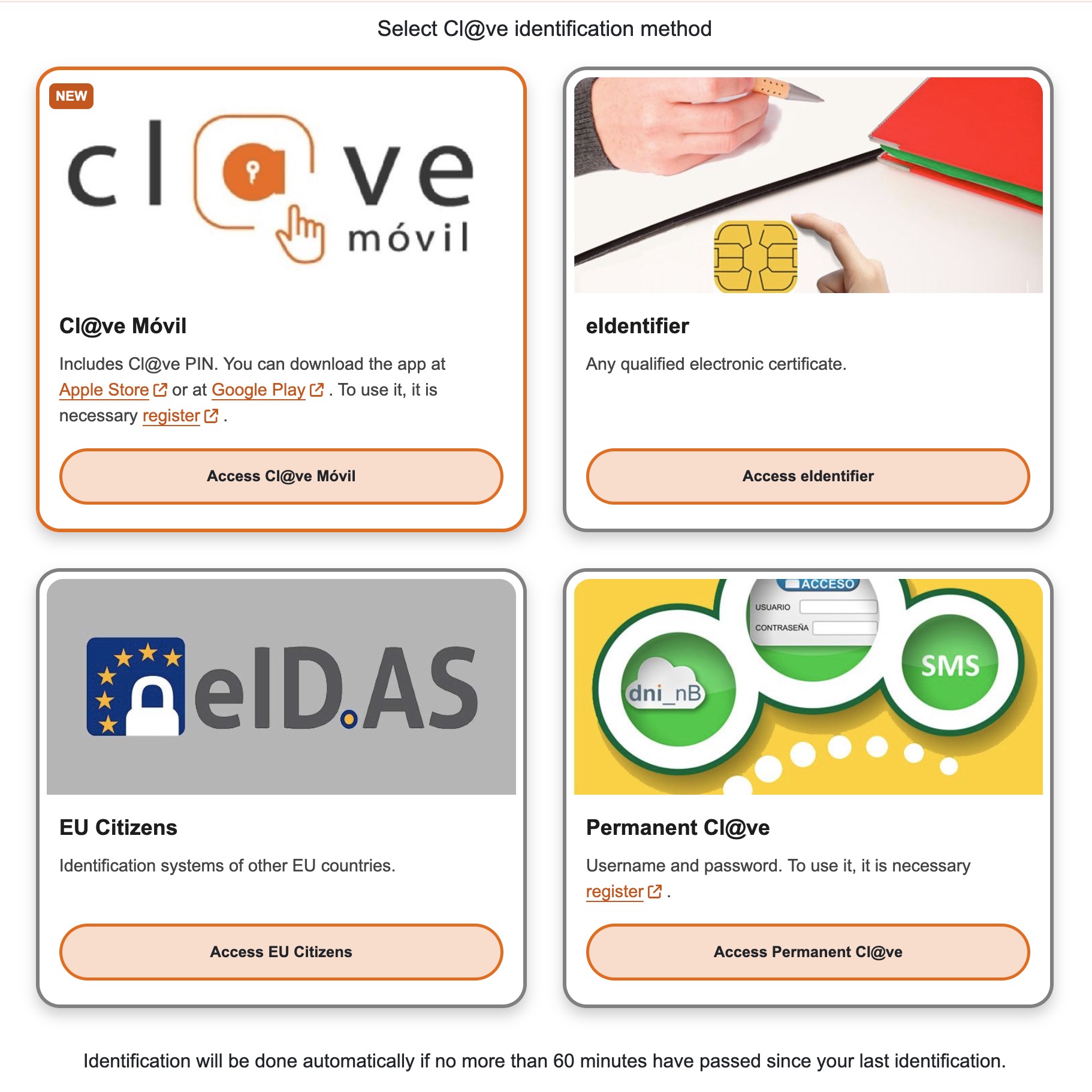
Same Cl@ve page, four buttons. For NIE/TIE holders the two roads are Cl@ve (Móvil or Permanente) and eIdentifier (the certificate). EU Citizens is eIDAS for other EU logins — not a third Spanish method. Screenshot 17 August 2026.
| Cl@ve | eIdentifier | |
|---|---|---|
| What it does | Proves who you are (login) | Proves who you are — and can sign |
| Mercurio extranjería filing: sign, then submit | Cannot | Can — it calls the digital certificate already on your PC |
| ICP (cita / lote) | Often enough, or not needed | Not required to book; useful if the site offers a certificate login |
| How you use it | Phone: scan the QR, match the 3-digit code, confirm in the app. Or username + password | Click eIdentifier (English) or DNI-e / certificado electrónico (Spanish); the PC offers the certificate you installed |
| How you get it | Register Cl@ve | Get the FNMT certificate and install it. You do not apply for a separate “eIdentifier” |
| When | Phone, another computer, or you only need to look something up | Your own PC, certificate already installed, especially a signed Mercurio filing |
| Who | You have no certificate yet, or you are not on your PC | You must file a signed extranjería renewal yourself, or you already use that PC every day |
The other words are not extra systems:
- Digital certificate — the file on your computer that eIdentifier uses. For most people with a NIE, that file is the FNMT software certificate. Install once.
- Card reader — for a Spanish DNI chip. The usual FNMT certificate for foreigners does not need one.
- QR code and 3-digit code — how Cl@ve Móvil checks that the website and the phone are the same login.
The one job Cl@ve cannot do
For the types it lists, renewing the authorization (residence or stay) online is Mercurio, on sede.administracionespublicas.gob.es — not ICP.
That step is sign first, then submit. Official Mercurio: a recognised digital certificate or DNIe, plus AutoFirma. Migraciones says the same: electronic renewals need a digital certificate or DNIe.
That signature is eIdentifier calling the FNMT digital certificate. Cl@ve Móvil / Permanente has no signature for this step. If you only have Cl@ve, you can log in to many pages — you cannot complete that Mercurio packet.
Official line: agreed-key Cl@ve identifies you; it does not electronically sign (except a rare Cl@ve Firma that almost no TIE procedure uses). administración.gob.es
ICP is the appointment and lote site. Booking a fingerprint slot there is not the signed renewal packet.
A granted authorization is still not the plastic card. Fingerprints stay in person. Then check lote.
How to choose
- Filing on Mercurio (sign + submit): Mercurio guide — get the digital certificate, install AutoFirma, then click eIdentifier.
- Only checking or booking, on your phone: Cl@ve. ICP cita often works without either.
- Do not buy a card reader to “turn on eIdentifier” if you already use the FNMT file on the PC.
Check the card (#lote)
Login is not lote. NIE is the number, TIE is the card, lote is the queue after fingerprints.
Check lote here: https://sclt.es/tie/consultar/
The ICP site can go down for maintenance. SCLT is the check page; numbers and meanings still follow official data.
#NIE #TIE #lote
How-to: Mercurio · eIdentifier · Cl@ve · Digital certificate · What is TIE? · What is lote? · Check lote
Found an error?
Tell us what's wrong: broken links, changed requirements, incorrect contact details, or business authorization issues.